� credentials, secured

BSH SDI Agent

The macOS menu-bar agent for BSH's Secure Semantic Data Injection protocol. Encrypted credential payloads arrive over an OSC 7777 terminal escape, never touching ps, shell history, or disk.

# load the SDI module in BSH
[9628.42] % zmodload bsh/sdi
# inject an ephemeral auth payload — plaintext never in history
[9628.42] % printf '{"username":"alice","password":"s3cr3t","ttl":300}'
> | bsh-inject --type ephemeral-auth --context https://app.example.com
# OSC 7777 emitted to /dev/tty (invisible in terminal):
\e]7777;<sid>;<ctr>;<type>;<ctx>;<nonce>;<ct>;<tag>\a
# SDI Agent decrypts, stores in memory, shows in menu bar
Download & install → View on GitHub

Menu bar. Lock icon. Nothing else.

When a credential arrives the lock opens and shows a live entry with a TTL countdown. Copy any field to the clipboard with a click. When the timer expires, the entry vanishes — nothing remains.
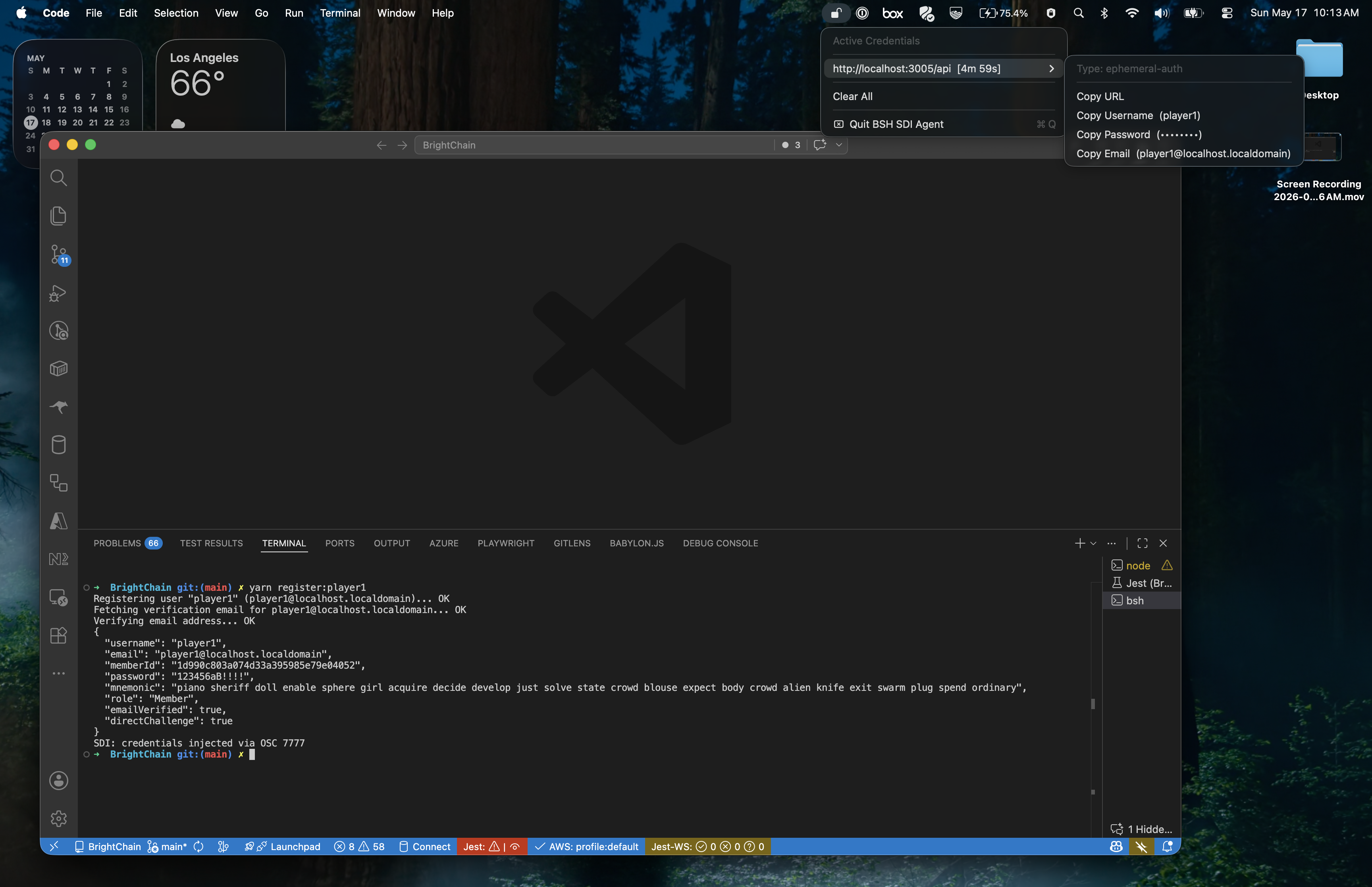
BSH SDI Agent menu bar showing an active ephemeral-auth credential with TTL countdown

Full demo: BSH shell → bsh-inject → OSC 7777 → SDI Agent decrypts and shows credential in menu bar.

Credentials don't belong in your shell history.

Every time you paste a password into a terminal, type an API token as a command-line argument, or export a secret into $ENV, you leave a trail: ~/.zsh_history, ps aux, /proc/<pid>/cmdline, log aggregators. Even read -s leaves the secret in a shell variable that any child process can inherit.

Secure Semantic Data Injection (SDI) is an original BSH invention that breaks this chain. The bsh-inject builtin encrypts a structured credential payload and delivers it as an OSC 7777 terminal escape sequence — a channel that is invisible to the terminal emulator, invisible to ps, and never written to command history. The BSH SDI Agent is the macOS counterpart: a menu-bar daemon that receives, decrypts, and acts on those payloads.

🧩 Without SDI

Surface Leaked to
CLI argument ps aux, shell history
export SECRET=… child processes, env
read -s shell variable, child processes
Clipboard paste clipboard history managers
curl -u user:pass ps, shell history

🔐 With SDI

Property Guarantee
Shell history Only the bsh-inject call — no plaintext
ps No secret in args or environment
Disk Never written — in-memory only, TTL-gated
Replay attacks Monotonic counter bound in GCM AAD
Session leakage Ephemeral X25519 key, 8-hour expiry

Four steps from shell to agent.

1

X25519 handshake at login

When a BSH shell starts, it connects to the agent's randomized Unix domain socket ($SDI_SOCKET_PATH or ~/.config/sdi/socket) and sends a 48-byte binary packet: a 16-byte random session_id followed by the shell's ephemeral X25519 public key. The agent responds with its own 32-byte public key. Both sides derive a 32-byte session key via HKDF-SHA256 — never written to disk, sessions expire after 8 hours.

2

Encrypt in the shell

bsh-inject reads stdin and encrypts it with AES-256-GCM. The --type, --context, and a monotonic sequence counter are passed as length-prefixed GCM AAD — bound into the auth tag so that tampering with metadata or replaying a captured sequence invalidates the ciphertext.

3

Deliver over the terminal

The ciphertext is emitted as an OSC 7777 escape written directly to /dev/tty — invisible in the terminal, invisible to ps, absent from shell history. If the agent is unavailable, bsh-inject fails closed rather than falling back to plaintext.

4

Agent decrypts and acts

The SDI Agent parses the OSC 7777 sequence, verifies the GCM auth tag (covering counter, type, and context), enforces the monotonic counter to reject replays, decrypts the payload, and stores it in memory with its TTL. Entries appear in the menu bar with a countdown and copy-to-clipboard actions. Decrypted state is purged automatically after ttl seconds.

X25519 ECDH AES-256-GCM HKDF-SHA256 OSC 7777 monotonic counter randomized socket AAD-bound auth tag fail-closed
# shell → agent: 48-byte binary handshake
session_id[16] || shell_pub[32] →
← agent_pub[32]
# HKDF-SHA256 → 32-byte session key (memory only)
# OSC 7777 packet structure (7 fields):
ESC]7777;
<session_id_hex>;
<b64 counter>;
<type>;
<b64 context>;
<b64 nonce>;
<b64 ciphertext>;
<b64 auth_tag>BEL
# counter + type + context → GCM AAD
# agent verifies tag, checks counter, stores plaintext

Full specification: RFC — Secure Semantic Data Injection via OSC 7777

Defence in depth, on every surface.

🎲

Randomized socket path

Generated fresh at each launch: /tmp/sdi-agent-<16 hex chars>. The agent aborts immediately if the path already exists — preventing socket squatting even in shared /tmp environments. Permissions are set to chmod 600 (owner only).

📦

App Sandbox enabled

The app runs in the macOS App Sandbox. The socket path is advertised via launchctl setenv in non-sandboxed builds, and via ~/.config/sdi/socket as a sandbox-safe fallback (covered by a scoped home-relative-path entitlement).

🔑

Ephemeral forward secrecy

Each BSH session generates a fresh X25519 keypair. The derived 32-byte session key lives only in memory and is revoked when the shell disconnects. Capturing a past session key does not compromise future sessions.

🔁

Replay protection

A per-session monotonic counter is incremented with every bsh-inject call and bound into the GCM AAD. The agent tracks the next expected counter and rejects out-of-order or replayed packets immediately.

🚦

Rate limiting

Sessions are locked out after 10 decryption failures within 60 seconds, preventing brute-force attacks against a stolen ciphertext.

⏱️

8-hour session expiry

Sessions expire after 8 hours regardless of activity. Credential entries are additionally gated by their own ttl field (default 300 s) and swept every 10 seconds. Nothing lingers.

🔒

Fail-closed

If the agent is unreachable, bsh-inject returns an error — it never falls back to emitting plaintext. Credential delivery is all-or-nothing.

🧹

Memory hygiene

Crypto keys are revoked on shell disconnect. Credential entries are purged after their TTL. No data is written to disk. No crash reports, analytics, or telemetry are collected.

Structured credential payloads.

Payloads are JSON objects encrypted with AES-256-GCM before leaving the shell. The agent decodes them after decryption. Unknown keys are ignored — the format is designed to be extensible.

🔐 ephemeral-auth

Web login credentials, API tokens, or any short-lived secret bound to a URL context.

{
  "type": "ephemeral-auth",
  "context": "https://app.example.com",
  "ttl": 300,
  "data": {
    "username": "alice",
    "password": "s3cr3t",
    "email": "alice@example.com"
  }
}
usernameCopied to clipboard on request
passwordShown as •••••••• in menu
emailOptional; shown if present

🗄️ db-connection

Database credentials: engine, host, port, user and password — all in one encrypted packet.

{
  "type": "db-connection",
  "context": "postgres://localhost/mydb",
  "ttl": 600,
  "data": {
    "engine": "postgres",
    "host": "localhost",
    "port": 5432,
    "user": "alice",
    "pass": "s3cr3t"
  }
}
enginee.g. postgres, mysql
hostHostname or IP address
portTCP port
user / passCredentials

The menu-bar entry for each active credential shows the context URL, a TTL countdown, and copy-to-clipboard actions for each field. Passwords and tokens are displayed as •••••••• in the menu title but copied in full.

Install the agent.

The BSH SDI Agent is a macOS-only SwiftUI app. It requires macOS 13 Ventura or later and pairs with BSH with the bsh/sdi module loaded.

1

Build in Xcode

Clone the repository and open BSH SDIAgent.xcodeproj in Xcode 15 or later. Select the BSH SDIAgent scheme and press ⌘R. No external dependencies — all cryptography uses Apple's built-in CryptoKit framework.

git clone https://github.com/Digital-Defiance/bsh-sdi-agent.git
cd bsh-sdi-agent
open "BSH SDIAgent.xcodeproj"
2

Launch at login

Move the built BSH SDIAgent.app to /Applications and add it to System Settings → General → Login Items so it starts automatically with your session.

3

Install BSH

Install BSH — the shell that generates SDI payloads. The agent advertises its socket path via $SDI_SOCKET_PATH and ~/.config/sdi/socket, which BSH reads automatically at startup.

brew tap digital-defiance/tap
brew install bsh
4

Load the SDI module and inject

In a BSH session, load bsh/sdi and use bsh-inject to deliver an encrypted payload. The lock icon in your menu bar will open and show the active credential with a TTL countdown.

zmodload bsh/sdi

printf '{"username":"alice","password":"s3cr3t","ttl":300}' \
  | bsh-inject --type ephemeral-auth --context https://app.example.com

Mac App Store: A notarized build distributed through the Mac App Store is coming soon. Until then, build from source using the steps above.

The BSH ecosystem.

🐚

BSH — BrightShell

The zsh-compatible shell that originates SDI payloads via bsh-inject. Also features BrightDate timestamps baked into every time-related surface: prompt, ls -l, stat, history, and glob qualifiers.

📄

OSC 7777 RFC

The full protocol specification: wire format, ECDH handshake, AAD construction, replay-protection counters, and error handling. Read the RFC →

🏢

Digital Defiance

Open-source software by Digital Defiance. BSH, the SDI Agent, BrightDate, and related tools are all developed and maintained here.